
|
 FAQ Home FAQ Home
 Curtain e-locker Curtain e-locker
 Installation Guide Installation Guide
User Guide
Curtain LogTrace
Curtain MonGuard
Curtain PrintTrail
Website Product Page
Curtain e-locker
Curtain LogTrace
Curtain MonGuard
Curtain PrintTrail |
| FAQ No.: | 00416 |
| Category: | Curtain Admin; Curtain Client; Definitions; Uninstallation |
|
| | |
| Question: | What if we use more software licenses than we purchased?
|
| | |
| Answer: | The Curtain software will continue to function normally. However, you are responsible for complying with our End User License Agreement (EULA) and must purchase additional licenses to cover any shortfall.
Our customers are required to perform a software activation annually. This process allows us to monitor usage within your environment. If it is discovered that you are using more licenses than you have purchased, you will be required to purchase the necessary additional licenses.
If the overusage is simply due to the software being installed on retired PCs, you can resolve this by uninstalling the client programs from those machines and removing them from the Curtain Admin console. The steps to do this are below.
Steps to remove unnecessary clients:
1. Uninstall the client programs from those users' machines
2. In Curtain Admin (or Curtain Lite Admin) > Client, select a machine and right-click to Remove
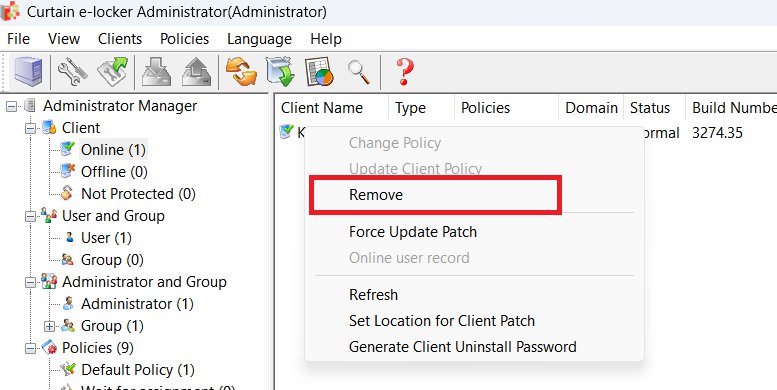
3. After removing all necessary clients, please re-generate the Activation Request File (ARF). Then, capture a screenshot of the Curtain Admin client list and email both the new ARF and the screenshot to registration@coworkshop.com.
4. Done.
About software license terms, please refer to FAQ 00379 - Client License Terms for Terminal Server/Remote Desktop Environments |
| |
| |
| |
| |
| |
|
| |
| |
| |
| |
|
 FAQ
FAQ