
|
 FAQ Home FAQ Home
 Curtain e-locker Curtain e-locker
 Installation Guide Installation Guide
User Guide
Curtain LogTrace
Curtain MonGuard
Curtain PrintTrail
Website Product Page
Curtain e-locker
Curtain LogTrace
Curtain MonGuard
Curtain PrintTrail |
| FAQ No.: | 00425 |
| Category: | Curtain Server Plug-in |
|
| | |
| Question: | How to configuare crplugin in Linux?
|
| | |
| Answer: | After installing the Curtain plugin, there are two ways to configure, One is via command line interface, The other one is via graphical user interface. The steps are as follows.
Command Line Interface:
1. enter"cd /usr/local/curtain/bin"

2. enter "./crplugintools /help" to show configuration manual

3. Usage: ./crplugintools [options] [Arguments] [parameters]
Options:
- -h -help Displays this help.
- -v -version Displays version information.
- --port Port protection option.
- --http Web application protection option.
- --rule Rule protection option.
- --Authstr Authorization string setting option.
- --loglevel Log level Setting option.
- --tomcat Tomcat setting option.
- --refresh Refresh option.
Arguments:
- -l Displays setting list.
- -i Insert item.
- -d Delete item.
- -m Modify item.
- -e Enable option.
- -t Modify type.
Parameters:
--port
"port","protocol","protectediptype","ip"
protocol:
- 6 mean "TCP",
- 17 mean "UDP"
protectediptype:
- 0 mean "All IPs",
- 1 mean "Specific IP"
--http
"port","url","protectediptype","ip"
protectediptype:
- 0 mean "All IPs",
- 1 mean "Specific IP"
--rule
"ip","type"
type:
- 0 mean "Ipv4",
- 1 mean "Ipv6"
--rule -t
- 1 mean "Protect All",
- 2 mean "Disable Pritection",
- 3 mean "Protect Address List Only",
- 4 mean "Protect All Except Address List"
--authstr
--loglevel
"loglevel"
--loglevel -m
- 0 mean "Disable",
- 1 mean "Fatal",
- 2 mean "Error",
- 4 mean "Info",
- 5 mean "Mark",
- 6 mean "Debug",
- 8 mean "Flow",
- 10 mean "All"
--tomcat
"sslport","tls"
-e
- 0 mean "Disable",
- 1 mean "Enable"
Remarks:
- "-l" and "-d" arguments support wildcard '*', It means match any character.
- "-l" and "-d" arguments support wildcard '?', It means match one character.
- "-l" arguments support "all" command, It means display all setting of option.
- All of arguments support input multiple, seperate by ','.
Examples
Port:
Add
- ./crplugintools --port -i "{"port":1234,"protocol":6,"protectediptype":0}"
- ./crplugintools --port -i "{"port":1234,"protocol":6,"protectediptype":0},{"port":5678,"protocol":17,"protectediptype":0}"
- ./crplugintools --port -i "{"port":1234,"protocol":6,"protectediptype":1,"ip":"192.168.1.1"}"
Delete
- ./crplugintools --port -d "{"port":1234,"protocol":6}"
-
- ./crplugintools --port -d "{"port":1234,"protocol":6},{"port":5678,"protocol":17}"
-
- ./crplugintools --port -d "{"port":1*4,"protocol":6},{"port":5??8,"protocol":17}"
-
- ./crplugintools --port -d "{"port":1234,"protocol":6,"protectediptype":1,"ip":"192.168.1.1"}"
List
- ./crplugintools --port -l "{"port":*,"protocol":6}"
-
- ./crplugintools --port -l "{"port":12??,"protocol":6},{"port":56*8,"protocol":17}"
-
- ./crplugintools --port -l
-
- ./crplugintools --port -l all
Modify
- ./crplugintools --port -m "[{"port":1234,"protocol":6,"protectediptype":0},{"port":5678,"protocol":17,"protectediptype":1}]"
-
- ./crplugintools --port -m "[{"port":1234,"protocol":6,"protectediptype":0,"ip":"192.168.1.1"},{"port":5678,"protocol":17,"protectediptype":1,"ip":"192.168.1.2"}]"
Enable
- ./crplugintools --port -e 1
Disable
- ./crplugintools --port -e 0
Http:
Add
- ./crplugintools --http -i "{"port":1234,"url":"/site/site1","protectediptype":0}"
-
- ./crplugintools --http -i "{"port":1234,"url":"/site/site1","protectediptype":0},{"port":1234,"url":"/site/site2","protectediptype":0}"
-
- ./crplugintools --http -i "{"port":1234,"url":"/site/site1","protectediptype":1,"ip":"192.168.1.1"}"
Delete
- ./crplugintools --http -d "{"port":1234,"url":"/site/site1"}"
-
- ./crplugintools --http -d "{"port":1234,"url":"/site/site1"},{"port":5678,"url":"/site/site2"}"
-
- ./crplugintools --http -d "{"port":1234,"url":"/site/*"}"
-
- ./crplugintools --http -d "{"port":1234,"url":"/site/*","protectediptype":1,"ip":"192.168.1.1"}"
List
- ./crplugintools --http -l "{"port":1234,"url":"/site/*"}"
-
- ./crplugintools --http -l "{"port":12??,"url":"/site/site?"},{"port":56*8,"url":"/site/*"}"
-
- ./crplugintools --http -l
-
- ./crplugintools --http -l all
Modify
- ./crplugintools --http -m "[{"port":1234,"url":"/site/site1","protectediptype":0},{"port":5678,"url":"/site/site2","protectediptype":1}]"
-
- ./crplugintools --http -m "[{"port":1234,"url":"/site/site1","protectediptype":0,"ip":"192.168.1.1"},{"port":5678,"url":"/site/site2","protectediptype":1,"ip":"192.168.1.2"}]"
Enable
- ./crplugintools --http -e 1
Disable
- ./crplugintools --http -e 0
Rule:
Add
- ./crplugintools --rule -i "{"ip":127.0.0.1,"type":0}"
-
- ./crplugintools --rule -i "{"ip":127.0.0.1~2,"type":0}"
-
- ./crplugintools --rule -i "{"ip":127.0.0.1,"type":0},{"ip":fe80::8091:de52:9b24:2a88,"type":1}"
Delete
- ./crplugintools --rule -d "{"ip":127.0.0.1,"type":0}"
-
- ./crplugintools --rule -d "{"ip":127.0.0.1,"type":0},{"ip":fe80::8091:de52:9b24:2a88,"type":1}"
-
- ./crplugintools --rule -d "{"ip":127.0.0.*,"type":0}"
List
- ./crplugintools --rule -l "{"ip":*,"type":0}"
-
- ./crplugintools --rule -l "{"ip":127.0.0.?,"type":0},{"ip":192.168.?.*,"type":0}"
-
- ./crplugintools --rule -l
-
- ./crplugintools --rule -l all
Modify
- ./crplugintools --rule -m "[{"ip":127.0.0.1,"type":0},{"ip":127.0.0.2,"type":0}]"
Modify type
- ./crplugintools --rule -t 1
-
- ./crplugintools --rule -t 2
Authstr:
List
- ./crplugintools --authstr -l
Modify
- ./crplugintools --authstr -m "new authorization string"
LogLevel:
List
- ./crplugintools --loglevel -l
Modify
- ./crplugintools --loglevel -m 10
Tomcat:
List
- ./crplugintools --tomcat -l
Modify
- ./crplugintools --tomcat -m "{"sslport":8443,"tls":"TLSv1,TLSv1.1,TLSv1.2,TLSv1.3"}"
Refresh:
refresh
- ./crplugintools --refresh
Scenario, add IP or IP range to exception rule
- add single IP to list, run "./crplugintools --rule -i "{"ip":127.0.0.1,"type":0}"
Or add IP range to list, run "./crplugintools --rule -i "{"ip":127.0.0.1~5,"type":0}"
- 0 mean "Ipv4",
- 1 mean "Ipv6"
- set "protected all except address list", run "./crplugintools --rule -t 4"
- 1 mean "Protect All",
- 2 mean "Disable Pritection",
- 3 mean "Protect Address List Only",
- 4 mean "Protect All Except Address List"
- after set all done, run "./crplugintools --refresh".
Then, run "cat cat /usr/local/curtain/conf/plugin.conf" to double check settings.
Graphical User Interface
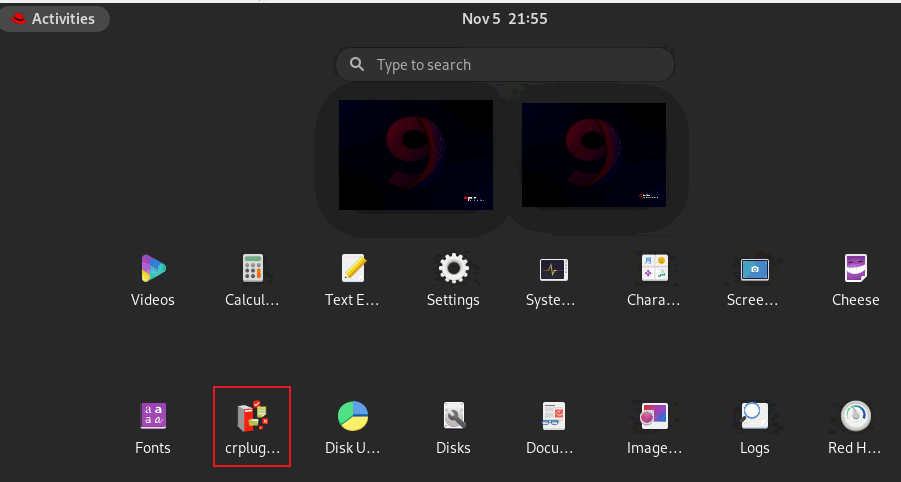
1. Launch crplugin in Applications list.
2. In this page, you can view the settings or click "Rule" button to setup exception.
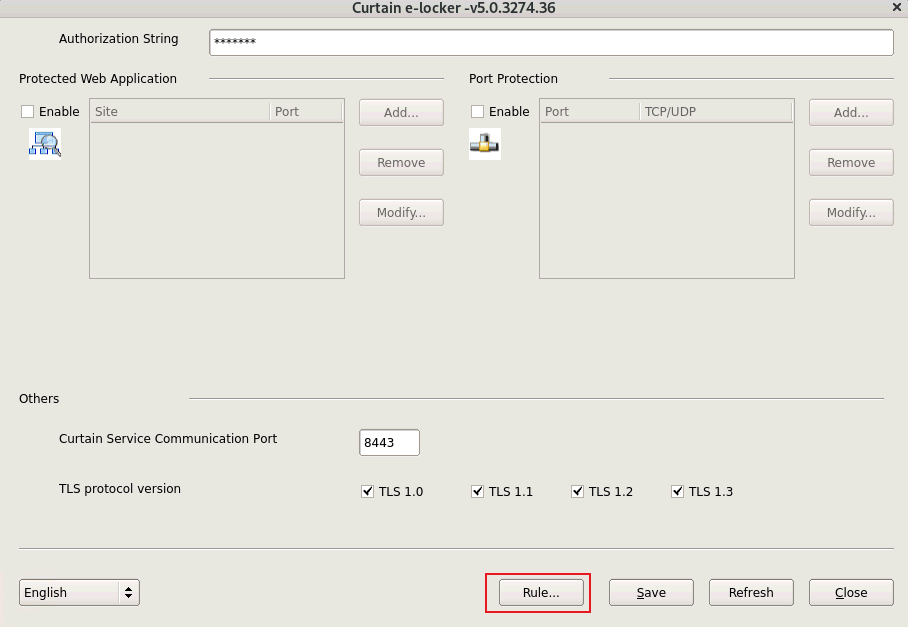
P.S. please refer to FAQ00142 How to set Exception Rule? |
| |
| |
| |
| |
| |
|
| |
| |
| |
| |
|
 FAQ
FAQ