
|
 FAQ Home FAQ Home
 Curtain e-locker Curtain e-locker
 Installation Guide Installation Guide
User Guide
Curtain LogTrace
Curtain MonGuard
Curtain PrintTrail
Website Product Page
Curtain e-locker
Curtain LogTrace
Curtain MonGuard
Curtain PrintTrail |
| FAQ No.: | 00300 |
| Category: | Curtain MonGuard |
|
| | |
| Question: | How to create Control Policy Group for Curtain MonGuard?
|
| | |
| Answer: | Administrators can create many Control Policy Groups in Curtain MonGuard for different workstations/users. Here is an example of Control Policy Groups for reference.
- Default Policy: for general users, always display Full Screen Watermark
- Managers: for senior management, only display Application Screen Watermark for MS Word, Excel, PowerPoint and Adobe Reader in office hours
Steps to create Control Policy Group:
1. In Curtain Lite Admin, select "File > New Policy" in the menu. Then you will be asked to enter new Policy Name.

2. Enter new Policy Name and click OK to confirm.
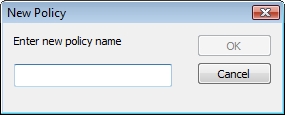
If you need to modify it, please refer to FAQ 00302 - How to configure Control Policy Group for Curtain MonGuard |
| |
| |
| |
| |
| |
|
| |
| |
| |
| |
|
 FAQ
FAQ