
|
 FAQ Home FAQ Home
 Curtain e-locker Curtain e-locker
 Installation Guide Installation Guide
User Guide
Curtain LogTrace
Curtain MonGuard
Curtain PrintTrail
Website Product Page
Curtain e-locker
Curtain LogTrace
Curtain MonGuard
Curtain PrintTrail |
| FAQ No.: | 00456 |
| Category: | Curtain PrintTrail |
|
| | |
| Question: | How to create Control Policy Group for Curtain PrintTrail?
|
| | |
| Answer: | Administrators can create many Control Policy Groups in Curtain Lite Admin for different workstations/users. Here is an example of Control Policy Groups for reference.
- Default Policy: for general users, enable Print Log and Printout Watermark
- Sensitive Teams: For departments handling sensitive files: additionally enables Snapshot for Printouts.
Steps to create Control Policy Group:
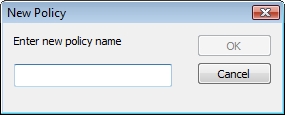
1. In Curtain Lite Admin, select "File > New Policy" in the menu. Then you will be asked to enter new Policy Name.

2. Enter new Policy Name and click OK to confirm.
To modify the policy group, please refer to FAQ 00462 - How to configure Control Policy Group for Curtain PrintTrail? |
| |
| |
| |
| |
| |
|
| |
| |
| |
| |
|
 FAQ
FAQ